Great way to avoid frame by frame masking...works best with good contrast
Used in Clip view: Double click the clip in the Timeline panel
The finger dance for brushes in After Effects - not all the same shortcuts as other programs
Zoom in and out: (.) and (,) or 2 finger drag on a touch pad or the mouse wheel
Cmd or Ctrl drag to resize the brush tool
Hold the space bar to navigate the stage
Choose the roto brush tool and paint over areas that you want to select. Continue painting to add to the selection. Hold the Opt/Alt key to subtract from the selection
You will need to add base frames every second to ensure accuracy.
In the effects panel you can increase the feathering
You can also use the Refine Edge tool for soften certain areas so it blends with the background better
Effects=> Keying
There are many keying effects. Color range is good just by clicking in the areas to key out
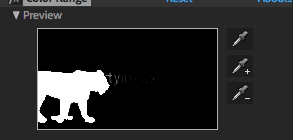 There are many keying effects. Color range is good just by clicking in the areas to key out